Setup ESLint and prettier in react app

Setting up ESlint and Prettier is tedious for beginners, I know this because I have faced this issue too. You will find many articles about setting up the linting on the internet. Some of them will work for you, some will not but most of them will be outdated because of the continuous growing of the library.
So, instead of picking our brain too much, we should try to understand few things.
What is ESLint?
ESLint statically analyses our code and find the problems. It is present in most of the editors.ESLint fixes are syntax-aware so you won't experience errors introduced by traditional find-and-replace algorithms.
Write your own rules that work alongside ESLint's built-in rules. You can customise ESLint to work exactly the way you need it for your project.
What is Prettier?
Prettier is an opinionated code formatter which is compatible with most of the languages. It saves a lot of time. It quickly indents our code on save (depends on VSCode/editor settings).
How to make them work together?
ESLint has also formatting rules which could conflict with prettier. So we should configure it carefully (sounds tough but it is very simple 😅)
Let's begin
Step 1 : -
npm install eslint --save-dev
 or
yarn add eslint --dev
Step 2 : -
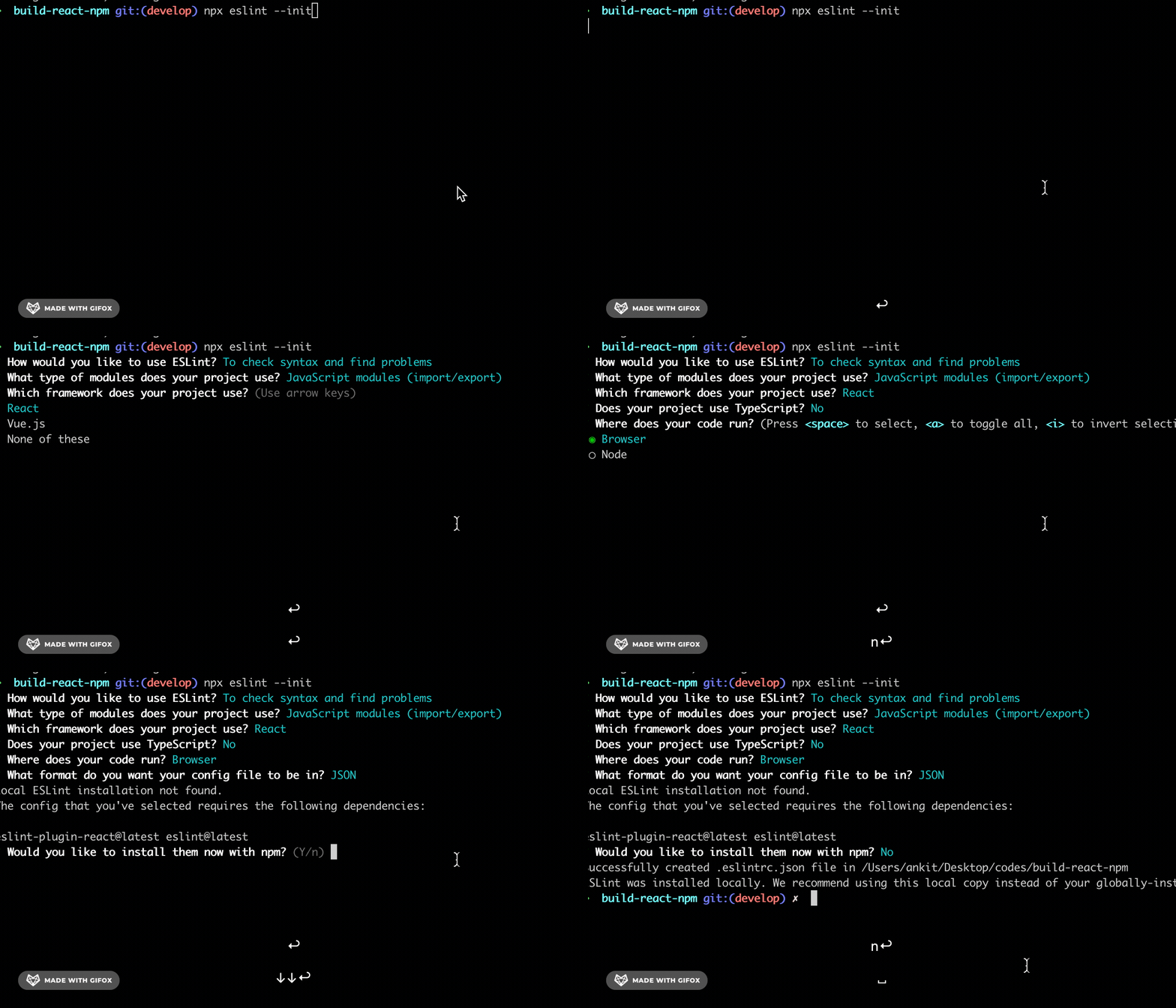
Create .eslintrc.json by running
npx eslint --init
 or
yarn run eslint --init
Step 3 : -
In React - 17.0.0, importing react to a file is optional,
To fix this, we will add a rule to our .eslintrc file. So open your .eslintrc file and add this line "react/react-in-jsx-scope": "off" inside the rules.
  "rules": {
    "react/react-in-jsx-scope": "off"
  }
Step 4 : -
If you are using jest then you will find that eslint is giving us an error that test or expect is not defined . To fix this we need to add "jest": true inside env.
  "env": {
    "browser": true,
    "es2021": true,
    "jest": true
  }
Step 5 : -
Now, add esling plugins to make it work with react, and make proper configuration for eslint and prettier so that they don't collide with each other
Install
npm install eslint-config-prettier eslint-plugin-prettier prettier --save-dev
or
yarn add eslint-config-prettier eslint-plugin-prettier prettier --dev
Please check each of their git repositories. eslint-config-prettier - Turns off all rules that are unnecessary or might conflict with Prettier.
eslint-plugin-prettier - Runs Prettier as an ESLint rule
After installing above, make changes to `.eslintrc` file.
"extends": ["eslint:recommended", "plugin:react/recommended", "plugin:prettier/recommended"]
We can run prettier separately but we want eslint to run it for us so that it does not conflict with the eslint rules.
Step 6: -
Create .prettierrc and paste the below code
{
  "semi": true,
  "tabWidth": 2,
  "printWidth": 100,
  "singleQuote": true,
  "trailingComma": "none",
  "jsxBracketSameLine": true
}
Now, eslint and prettier is setup lets add the script to the package.json
"lint": "eslint .",
"lint:fix": "eslint --fix",
"format": "prettier --write './**/*.{js,jsx,ts,tsx,css,md,json}' --config ./.prettierrc"
This should work but before you test it, it is better to restart your VSCode.
You are all setup to write your awesome code.
Thanks for dropping by 🌟 Add a ❤️ if you liked it. Checkout my GitHub profile for cool projects.